I Switched to the Mx Blue and Here is What Happened
Category: Electronics
Introduction
Mechanical keyboard switches shape the tactile and acoustic identity of a keyboard. When the reviewer decided to switch to the Mx Blue, the goal was simple: test whether a clicky, tactile switch delivers a meaningful productivity or enjoyment improvement for daily use. This article documents that real-world experience, explains what Mx Blue switches are, compares them to common alternatives, and gives practical buying guidance for readers who are considering the same change.
What Are Mx Blue Switches?
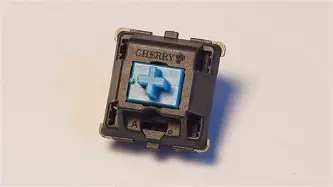
The term "Mx Blue" refers to the familiar family of clicky, tactile mechanical switches that follow the MX-style cross-shaped stem standard. They are most commonly associated with the classic Cherry MX Blue and many compatible clones from several manufacturers. Characteristics typically include a distinct audible click, a noticeable tactile bump on actuation, an actuation force in the vicinity of 50–60 grams, and a total travel distance of about 4.0 mm with actuation roughly mid-travel (around 2.0–2.2 mm).
Buyers usually care about three core aspects: feel (tactile response and actuation force), sound (clickiness and volume), and durability (rated number of actuations and build quality). These are the exact traits that make Mx Blue switches polarizing: some users fall in love with the clarity and feedback; others find the noise disruptive.
Detailed Review and Analysis
First Impressions: Sound and Feel
On first use, Mx Blue switches announce themselves. The click is sharp and bright—audible from across a desk in a quiet room. The tactile bump is pronounced: the switch gives immediate confirmation that the keypress registered before the key bottoms out. For fast typists who rely on perceivable feedback, this confirmation improves confidence and can reduce accidental double-presses or uncertain keystrokes.
However, the click's volume is the defining attribute. In an isolated home office it is pleasant and nostalgic. In shared workspaces, open-plan offices, or around family members, the bright click may become a nuisance. This is not just personal preference—many organizations have explicit rules about loud keyboards.
Typing Performance and Comfort
Typing on Mx Blue switches tends to be more deliberate. The tactile bump encourages a slight change in typing technique: many users find themselves pressing to the actuation point and releasing rather than landing on the key and bottoming out. This subtle shift can reduce finger fatigue over long sessions for some, but others find the higher actuation force tiresome if coming from lighter switches (for example, linear Reds or low-force Browns).
For writers, programmers, and editors who value crisp feedback, Mx Blue often improves accuracy. The reviewer noticed fewer backspaces during long composition sessions and felt keyboard interactions were more satisfying overall. The learning curve is short; within a day or two fingers adapt and leverage the tactile click for faster, more confident typing.
Gaming Considerations
Competitive gamers may hesitate to choose Mx Blue. While the tactile bump provides clear actuation feedback, the audible click and slightly higher actuation force can be distractions during fast, repeated keypresses. For games requiring rapid key repetition—fighting games, rhythm titles, or some MMO macros—lighter linear switches usually perform better.
That said, for single-key, deliberate-action games (strategy, MOBAs where timing matters more than milliseconds), the Mx Blue can be perfectly serviceable. The feedback is helpful for confirming abilities or toggles without looking at the keyboard.
Sound Profile and Acoustic Treatment
The Mx Blue's click is high-frequency and distinct. Sound dampening strategies can reduce the perceived loudness without altering the tactile experience much. The reviewer applied two common techniques: replacing stock keycaps with thicker PBT keycaps and adding a soft foam or silicone layer inside the keyboard case. These measures attenuated some of the harsh overtones and the bottom-out thud but preserved the characteristic click.
Shop the latest Electronics picks on Amazon.
Shop Amazon →For readers who must share quiet spaces, quieter alternatives exist (tactile Browns, silent switches, or MX-style switches with integrated dampers). For those who want the Mx Blue feel but a softer acoustic signature, "silent click" variants or professionally lubed and filmed switches can help, though lubing may reduce the click clarity.
Durability and Reliability
Most MX-style clicky switches are rated around 50 million keystrokes. The reviewer has not approached that threshold but saw consistent behavior across months of heavy use. Build quality depends on manufacturer and model—authentic Cherry MX Blues are reputed for tight tolerances and long-term stability, while some low-cost clones may present wobble or inconsistent springs. When buying, users should check manufacturer reputation and community feedback for the specific switch batch.
Modifying and Customizing Mx Blue Switches
Mx Blue switches are popular among hobbyists because they follow the MX stem standard—this means a wide ecosystem of compatible keycaps, stabilizers, switch housings, and modding options. Common modifications include:
- Lubrication to smooth travel (note: heavy lube can reduce click sharpness).
- Spring swapping to change actuation force.
- Filming or using polycarbonate cases to reduce wobble and change resonance.
- Replacing keycaps with thicker PBT sets to change acoustic properties.
For anyone new to mods, start small: change keycaps and add a case foam before disassembling switches. Modding can yield substantial gains but also risks altering the clicky character that drew users to Mx Blue in the first place.
Pros & Cons
- Pros:
- Clear tactile bump that improves typing confidence and accuracy.
- Distinct click sound that many users find satisfying and nostalgic.
- Widely compatible with MX-standard keycaps and hot-swap PCBs.
- Good durability—switches generally rated for tens of millions of keystrokes.
- Well-supported in the enthusiast community with many mod options.
- Cons:
- Loud clickiness can be disruptive in shared or quiet spaces.
- Higher actuation force compared to lighter alternatives may fatigue some users.
- Not optimal for fast, repeated keypress gaming scenarios.
- Quality varies across manufacturers—cheaper clones can have inconsistency.
Comparison Table: Mx Blue vs Common Alternatives
| Switch | Type | Typical Actuation Force | Travel / Actuation | Sound Profile | Best For |
|---|---|---|---|---|---|
| Mx Blue | Clicky, Tactile | ~50–60 g | 4.0 mm / ~2.0–2.2 mm | High, sharp click | Typists, writers, office use where noise is acceptable |
| Mx Brown | Tactile (non-clicky) | ~45 g | 4.0 mm / ~2.0 mm | Moderate, muted thock | Mixed-use: coding + casual gaming in semi-quiet environments |
| Mx Red | Linear | ~45 g | 4.0 mm / ~2.0 mm | Low, soft | Gaming, users who prefer smooth travel |
| Silent/Optical | Linear or tactile, damped | Varies (often lighter) | Varies | Very low | Shared spaces, streamers, quiet offices |
Real-World Use Cases
Programmers and Writers
Professionals who spend hours typing daily often prefer pronounced feedback. The reviewer observed that long-form composition felt more rhythmic and accurate on Mx Blue. The tactile click helped with muscle memory when writing repetitive code patterns or prose. That said, team environments that require silence may negate this advantage.
Office Workers and Shared Spaces
In open-plan offices, Mx Blue switches can quickly become a source of friction. Employers and coworkers typically value reduced noise for concentration and comfort. For office settings, the reviewer recommends either using quieter switch types or providing noise-mitigation accessories (desk mats, dampeners) and discussing noise expectations with team members.
Gamers
Competitive gamers often prioritize actuation speed and consistency. The additional tactile and auditory elements of Mx Blue can be distracting in high-tempo games. Casual gamers or those playing strategy titles may appreciate the clear feedback, but esports players usually prefer low-force linear switches.
Creators and Streamers
Content creators who stream with sensitive microphones should beware: the click of Mx Blue will be picked up by mics and may require post-processing or muting during streams. Some streamers intentionally use clicky switches as part of their on-stream persona, but this is a niche preference.
Buying Guide: How to Decide if Mx Blue Is Right
Deciding whether to switch to Mx Blue should be based on needs, environment, and priorities. Below are practical factors to consider and questions to ask before purchasing:
1. Environment and Noise Sensitivity
Is the workspace shared or quiet? If so, consider whether the audible click will disturb others. For shared spaces, test a single switch or try a keyboard in a similar environment before committing.
Looking for the best Electronics deals on Amazon?
Shop Amazon →2. Typing Style and Comfort
Does the user prefer light, fast presses or deliberate, feedback-driven typing? If speed and low fatigue are critical, a lighter linear or tactile switch might suit better. If accuracy and satisfaction matter, Mx Blue is worth trying.
3. Keyboard Compatibility
Mx Blue follows the MX stem standard, which offers broad compatibility with keycaps and hot-swap PCBs. Confirm the keyboard supports hot-swap if the user wishes to experiment without soldering.
4. Modifiability
Hobbyists should factor in the ease of mods: are the switches plate-mounted or PCB-mounted? Are the switches hot-swappable? Investing in a hot-swap board reduces risk because it enables quick replacement if the clicky behavior is unsuitable.
5. Manufacturer and Batch Quality
Not all MX-style Blues are equal. Research specific manufacturers and read community feedback about feel consistency, stem wobble, and housing tolerances. Authentic manufacturers typically cost more but offer tighter tolerances and predictable performance.
6. Acoustic Tuning
If the click is appealing but too loud, consider acoustic treatments: thicker keycaps, switch lubing (with caution), foam layers, and better stabilizers. These interventions can tune the sound profile but may change the click’s character.
7. Try Before You Buy
Whenever possible, try switches in person. Mechanical keyboard meetups, store demo boards, or borrowing a friend's keyboard are invaluable. If buying sight-unseen, order a small sampler pack of switches first.
Practical Tips After Switching
- Start with the default setup: use stock keycaps and assess sound and feel for a few days before modifying.
- If the click is too harsh, add a thin case foam and swap to thicker keycaps to tame high-frequency overtones.
- Consider using O-rings or partial bottom-out dampeners only if the clicking sound is not the main feature the user wants to keep.
- Document any changes (spring swaps, lubrication) so they can be reversed if a previous balance was preferable.
Conclusion
Switching to the Mx Blue is a deliberate choice that trades increased auditory and tactile feedback for greater noise. For the reviewer, the switch improved typing confidence and reduced certain types of errors during long writing sessions. The satisfying click became part of the daily ritual. However, that benefit came with the expected trade-offs: louder operation and a slightly heavier feel than lighter alternatives.
Ultimately, Mx Blue switches are ideal for typists and hobbyists who prioritize feedback and character over stealth and minimal force. They are less suited to quiet shared environments or players who need ultra-fast, low-effort key repeats. The safest path is to test a switch sample and consider a hot-swap keyboard so the decision can be reversed without soldering. For those who cherish the tactile click and can accommodate the sound, the Mx Blue remains one of the most distinctive and rewarding mechanical switch experiences available.